Search This Blog

Tuesday, January 19, 2010

December 2009 Cumulative Updates – SharePoint Version Level

The SharePoint December 2009 Cumulative Update was released on December 15, 2009, it consists of two particular updates WSS 3.0 – KB 977027 and MOSS 2007 – KB 977026.

Once the updates are applied the new version is: “12.0.0.6524”, as always make sure you backup properly your Farm in case of any possible disaster.

Dec2009_SharePointLevel

In case you are interested in finding in more details about the current SharePoint Level the following links are very useful:

Sunday, January 3, 2010

Happy New Year 2010!

To all readers and followers, hope you had a great Happy New Year!

Thursday, December 24, 2009

Merry Christmas


Wish all blog readers and followers the Merriest Christmas of them all!

Wednesday, December 23, 2009

A geeky Christmas Blog Posting

Recently, I came across a blog posting that a T-SQL Script that generates a Christmas Card. It is the best one I have encountered yet.

Hope you enjoy it as much as I have:

T-SQL Script Christmas Card Generator

Tuesday, November 24, 2009

Single Server Install – SharePoint 2010 with a Local Account

If you have had the chance to download either SharePoint Foundation 2010 or SharePoint 2010 it is most likely that you have attempted to install with a local account on a Single Server Install. Odds are you have probably gotten disappointed because the wizard did not allow the installation with a local account. You were not the only one disappointed, although that disappointment did fuel the need to find a solution.

After some research, I did find a useful blog posting from the field that had the exact solution to my dilemma. The solution consisted in using PowerShell and a script named: “New-SPConfigurationDatabase”; this script is to be executed through the SharePoint 2010 Management Shell.

The step-by-step process would be like this:

1- Open the PowerShell Management Shell

Entering the prompted items:

DatabaseName

DatabaseServer

FarmCredentials

Passphrase
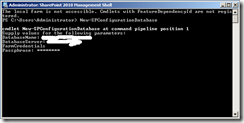
001

The process will take a while, when completed the cursor will appear in the command line.

2- Open the Configuration Wizard

002

Click Next Button

3- Restart the Services

003

Click Yes Button

4- Leave the Do not disconnect from this server setting selected

004

Click Next Button

5- Continue the normal course of the Configuration Wizard

There you go, now you have a Single Installation Server with a local account, this will work for both SharePoint Foundation 2010 and SharePoint 2010.

Tuesday, November 17, 2009

2010 Suite esta disponible para descarga!

Microsoft mantuvo su promesa, estan disponibles:
  • Office 2010
  • Visio 2010
  • Project 2010
  • SharePoint Designer 2010
  • SharePoint Foundation 2010
  • SharePoint Server 2010 

Apurate a descargarlos, estan en MSDN

2010 Suite is available for download!

Microsoft did keep their promise, the download of:
  • Office 2010
  • Visio 2010
  • Project 2010
  • SharePoint Designer 2010
  • SharePoint Foundation 2010
  • SharePoint Server 2010 

All are available on MSDN, go check them out!

Monday, November 9, 2009

Office 2010 Public Beta as early as next week?

I also was very excited as soon as I heard that news to, while it is not set in stone. Some CTP participants for the Office 2010 have received an email that hints to something like that.

If you would like to see more details about that email it can be found at this link:

http://www.neowin.net/news/main/09/11/09/offcie-2010-public-beta-to-begin-next-week

Friday, November 6, 2009

What to expect with SharePoint 2010

The details regarding SharePoint 2010 have long been awaited and while many have listed or blogged about it, this a compilation of many of these changes and enhancements.

While it is not in depth, it can be expanded with your comments and suggestions; feel free to leave comments so that we can improve upon this list.

  • Exclusive for 64 Bit Operating Systems
  • If you thought that MOSS 2007 was big SharePoint Server 2010 is huge!
  • No backward compatibility
    • In case you wanted to use SharePoint Designer 2010 to modify SharePoint 2007 sites; it is not possible
  • User Interface is Ribbon based
    • It is all over the place and a major and welcome improvement
  • Composites
    • A nice word to describe applications that have been created by the use of InfoPath, Designer, BCS, Web Parts, etc.
  • Improved and Enhanced Lists and Document Libraries
    • These can go easily into the millions!
    • External Lists – residing outside of SharePoint
    • More Event Receivers!
  • Editions
    • MOSS no more - It is SharePoint Server 2010
    • WSS - Now SharePoint Foundation
  • Services
    • PerformancePoint – Improved Business Intelligence
    • Visio
    • Project Gemini – An attempt to simplify BI for everyone
    • Access
  • Business Connectivity Services – New naming for what Business Data Catalog
  • Enhancements to the API
  • Online Services
    • Standard
    • Dedicated
    • Multi-Tenancy
  • Search
    • Improved and faster responses
    • Ability to deploy with FAST Technology
  • Social Computing Integration
  • SilverLight Integration
    • Through out of the box Web Part
  • SharePoint Designer 2010
    • Reusable Workflows – Same workflow can be used on multiple Lists in different Sites
  • New Theming Model
  • Content Types
    • Can be shared to other Site Collections
    • Improved Management
  • No longer tied to Windows Server Operating Systems
    • You can install on Windows 7
  • Shared Services Providers are no longer used
  • Visual Studio 2010 Integration
    • Interface for Web Part Development – Finally!
    • SandBoxed Solutions
      • Method to restrict Object Model and Resources based on a point based system, when a Solution reaches it it can be shutdown
    • Support for REST, LINQ
  • Office 2010 Integration
  • Workspace
    • Ability to customize the Forms for entering Data into Lists or Document Libraries

Wednesday, October 21, 2009

SharePoint 2010

Like with any new product there are new naming conventions, terms and concepts that emerge along with the product itself. Yes; there are many of those being brought to the light with the launch of SharePoint 2010.

Does that mean that everything has changed? Yes and No, some concepts and terms have remained the same although they have been improved upon. While others, are completely new and certainly deserve a detailed overview for a good understanding on how they can be applied and used in the real world.

In future blog postings we will be taking a look at all these new functionalities that will be part of the SharePoint 2010 Platform.

Stay tuned!

Monday, October 19, 2009

SharePoint 2010 Public Beta

The public beta will be available in November 2009.

Friday, October 16, 2009

Managing Techniques for Site Columns and Content Types

Thank you for attending the presentation at the Rocky Mountain SharePoint User Group, as promised enclosed you will find the slides and the sample code.

Managing Techniques for Site Columns and Content Types - Slides

Managing Techniques for Site Columns and Content Types - Code

Tuesday, October 13, 2009

New blog in town!

Yes! There is a new blog in which I have already subscribed to, it is located at:
http://www.sharepointmonk.com

The blog belongs to an extremely talented SharePoint Architect that has decided to join the blogging world: Joshua Hicks. Personally, I am looking forward to reading his blog posts.

Wednesday, September 30, 2009

Microsoft Security Essentials is no longer in Beta!

Almost everyone nowadays has or should have an Antivirus on their computer. The available choices usually come in the form of: free or purchased. While most of the time the free versions would not be as great as the purchased ones, a new contender is now available and no longer in Beta from Microsoft, this new product is named: “Microsoft Security Essentials”.

The purpose of Microsoft Security Essentials is to protect against:

  • Viruses
  • Spyware
  • Trojans
  • Rootkits

So far it is very impressive, quick and simplifies the whole process; not to mention that it even has some nice videos available for: installing, scanning and fixing problems.

Tuesday, September 29, 2009

How to resolve the message: “The Web site wants to run the following add-on: 'Name ActiveX Control' from 'Microsoft Corporation'. If you trust the Web site and the add-on and want to allow it to run, click here...”

Recently, I was asked if I had an idea of how to resolve this problem; the most common and easiest solution to fixing this problem is to add the site to the Trusted Sites in Internet Explorer; while this is the easiest way to fix the problem, some of the users might not like the fact that they will have to do this the first time they access the site.

The second method to fix this problem is more involved and requires the modification of the master page, the steps for achieving this are listed in great detail in the following article:

http://support.microsoft.com/default.aspx/kb/931509